What Tool Should I Use for FP&A?
Choosing the Right FP&A Software
If you have ever asked “what tool should I use for FP&A,” you are not alone. It is one of the most common questions finance leaders face as their teams grow and their data becomes harder to manage. The right FP&A software can transform how your team plans, forecasts, and communicates financial data across business units. The wrong one can cost you months of lost time and slow your business growth.
This guide breaks down the landscape clearly so you can make a confident decision.
Why the Right FP&A Tool Matters So Much
Financial Planning and Analysis sits at the heart of every major business decision. You are responsible for scenario planning, variance analysis, cash flow modeling, and making sure leadership has the right numbers at the right time.
When your toolset is weak, the consequences show up fast. Data silos grow between departments. Version control becomes a nightmare when ten people are emailing spreadsheets. Automated reporting breaks down and someone is always working off stale numbers. The evaluation process for new tools starts to feel urgent rather than optional.
The right platform eliminates these problems and gives your team governed workflows, real-time collaboration, and the modeling depth to handle whatever the business throws at you.
The Big Categories of FP&A Tools
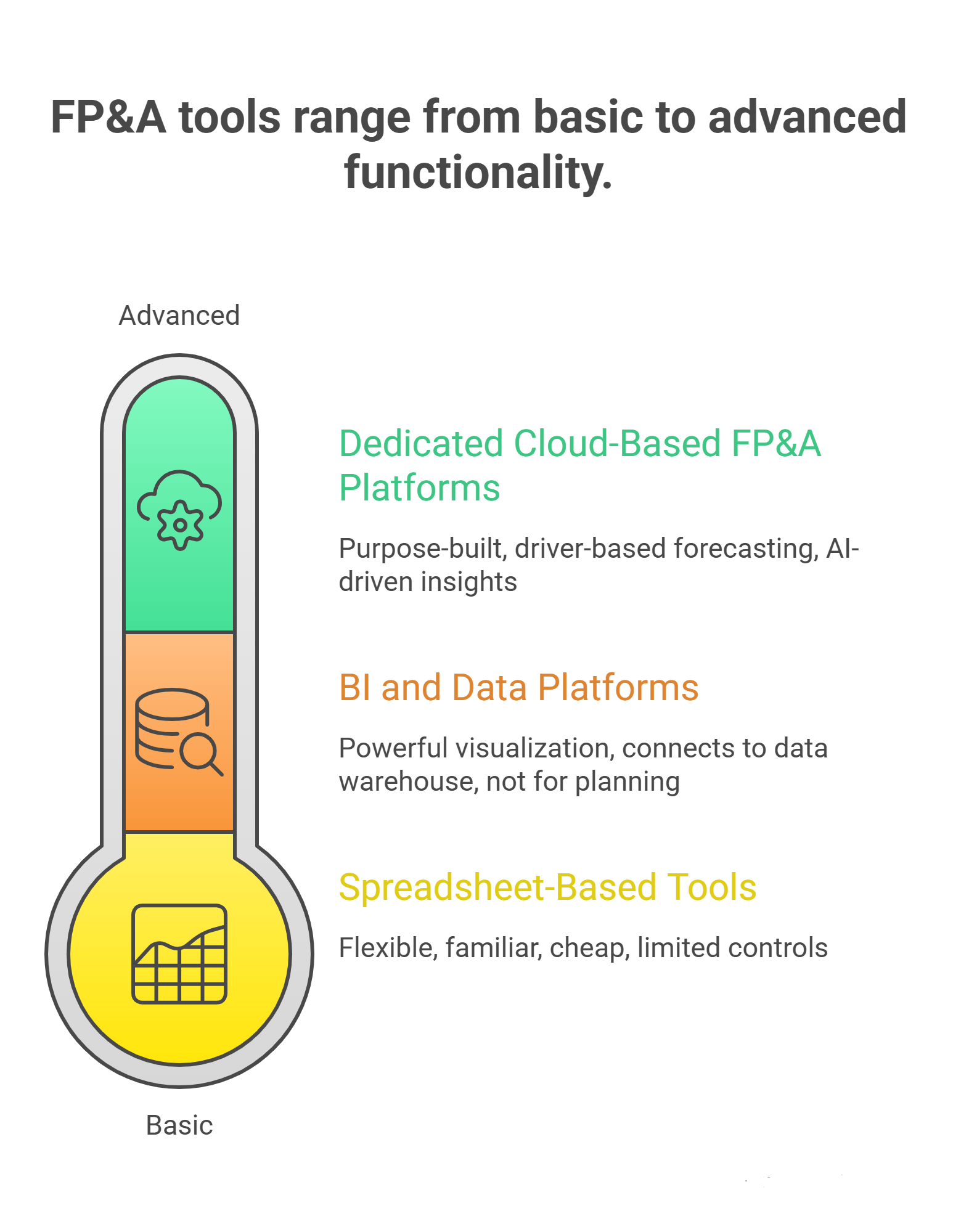
Before you decide what tool to use for FP&A, understand the three main categories you are choosing between.
Spreadsheet-Based Tools
Google Sheets and Excel are where most finance teams start. They are flexible, familiar, and cheap. For very small teams with simple models, they can work fine.
The problems surface quickly as complexity grows. There is no real version control. Collaboration features are limited in Excel and only partially solved in Google Sheets. There is no audit trail, no controls and approval processes built in, and no easy ERP/GL/CRM connectivity. Data staging is manual and error-prone.
Spreadsheets are not FP&A software. They are a starting point you will eventually outgrow.
Dedicated Cloud-Based FP&A Platforms
This is where purpose-built FP&A software lives. These platforms are designed specifically for Financial Planning and Analysis. They offer driver-based forecasting, scenario modeling, multi-entity support, and AI-driven forecasting out of the box.
Examples in this space include Vena Solutions, CCH Tagetik, Workday Adaptive Planning (which now features Workday Illuminate for AI-powered insights), Anaplan, and Planful. Each has a different profile in terms of modeling depth, user-friendly interface quality, implementation process complexity, and cost.
BI and Data Platforms
Tools like Power BI, Tableau, or Looker sit more in the reporting and analytics layer. They are powerful for visualization and connecting to a data warehouse, but they are not built for the planning and budgeting workflows that FP&A teams need. They work best as a complement to a dedicated FP&A platform rather than a replacement.
Key Criteria When Evaluating FP&A Software
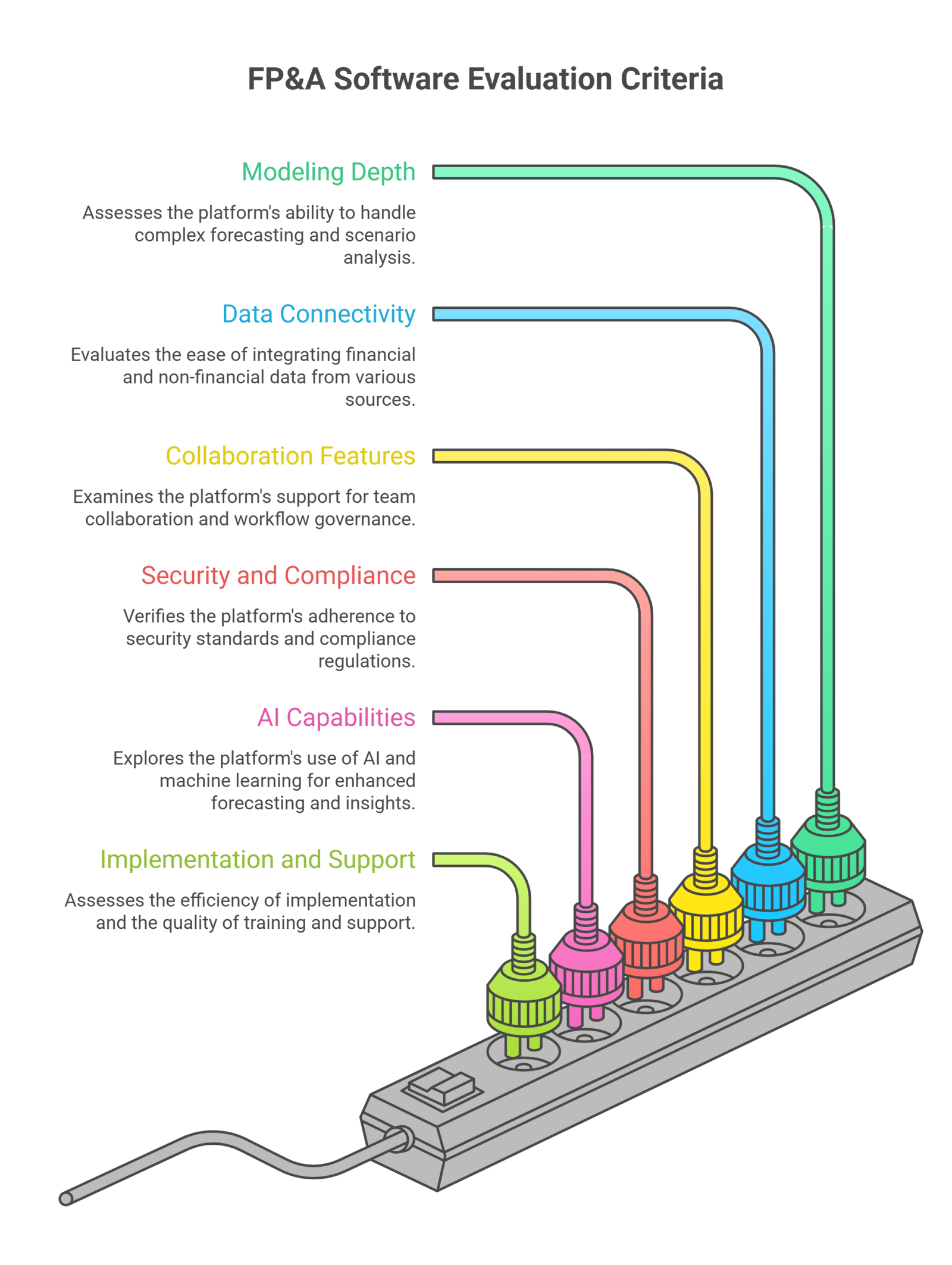
The question “what tool should I use for FP&A” really breaks down into a series of smaller questions about your specific situation.
1. Modeling Depth and Scenario Capabilities
Can the platform handle complex driver-based forecasting? Does it have a strong scenario and versioning engine? Can your team run scenario analysis across multiple assumptions simultaneously without rebuilding models from scratch?
Scenario planning is one of the highest-value things an FP&A team does. If your tool cannot do it well, you will be working around it constantly.
2. Data Connectivity
Modern FP&A requires pulling financial data from many places. You need ERP/GL/CRM connectivity that is reliable and doesn’t require a data engineering team to maintain. Some platforms handle this natively. Others require CSV data pulls and manual uploads, which defeats the purpose.
Ask vendors specifically about non-finance data integration. Headcount data, operational metrics, and sales pipeline data all feed into financial models. If you have to manually reconcile these inputs every month, you are losing hours you cannot afford.
3. Collaboration Features and Workflow Governance
Your team does not plan in isolation. Budget owners across business units need to contribute inputs. Leadership needs to review and approve. Collaborative workflows require the platform to support controlled workflows with proper controls and approval processes baked in.
Real-time collaboration is increasingly standard in modern FP&A platforms, but the quality varies a lot. Check how the platform handles version control specifically. Who can see what? Who can change what? How are conflicts resolved?
4. Security and Compliance
Enterprise finance teams need to ask about SOC 2 compliance, security practices around data access, and how the platform handles sensitive financial data. SOC 2 certification is a baseline signal that a vendor takes security seriously. Do not skip this part of your evaluation process.
5. AI and Machine Learning Capabilities
This is where the category is moving fast. AI-driven forecasting and machine learning models can dramatically improve forecast accuracy, especially for large datasets with complex seasonality. Generative AI is starting to appear in FP&A platforms too, with some vendors building agentic AI features that can surface anomalies, explain variances, and suggest adjustments automatically.
Workday Illuminate and similar AI-powered platform features represent next-generation FP&A capabilities. They are still maturing, but they are worth understanding and evaluating as part of your selection process. Artificial intelligence in FP&A is not a gimmick anymore. It is becoming a real competitive advantage for teams that use it well.
6. Implementation Process and Training and Support
A platform that takes 18 months to implement is not a solution, it is a project. Ask vendors for realistic implementation timelines and reference customers of similar size. Understand what internal resources you will need to commit and what happens after go-live.
Training and support quality matter enormously. FP&A platforms are complex and your team will have questions. A vendor with poor documentation and slow support will frustrate your team and reduce adoption. This is one of the most underrated parts of any software evaluation.
Popular FP&A Tools Compared
Here is a practical overview of the tools most commonly evaluated by FP&A teams.
Vena Solutions
Vena Solutions is built on top of Excel, which makes it very approachable for finance teams with heavy spreadsheet experience. It adds a centralized database, workflow and governance features, and version control while preserving the familiar Excel interface. It is a strong choice for mid-market companies that want governed workflows without abandoning the tools their team already knows.
The user-friendly interface is genuinely one of Vena’s strengths. Training and support is generally well-regarded. It is SOC 2 compliant and handles collaborative workflows across business units well.
Workday Adaptive Planning
Workday Adaptive Planning is one of the most widely deployed cloud-based FP&A platforms. It has strong scenario modeling, robust multi-entity support, and solid ERP/GL/CRM connectivity especially for organizations already in the Workday ecosystem. Workday Illuminate brings AI-driven forecasting capabilities into the platform.
It is a mature product with a large community and strong training and support resources. Implementation can be complex for large organizations, but the platform is well-documented.
Anaplan
Anaplan is built for enterprise-scale connected planning. Its modeling depth is exceptional and it handles large, complex models across many business units. If you have highly complex planning requirements, Anaplan is worth evaluating seriously.
The tradeoff is that the implementation process can be long and expensive, and it requires significant internal resources or a specialist consulting partner. It is not the right fit for smaller teams or those without strong technical capacity.
Planful
Planful positions itself as a cloud-based FP&A platform with strong automated reporting and a focus on the office of finance. It has a good balance of modeling capabilities and ease of use. The scenario and versioning engine is solid. It is a reasonable mid-market option if Vena or Workday feels like overkill.
CCH Tagetik
CCH Tagetik is built for complex, compliance-heavy environments. It is especially strong in consolidation, close management, and regulatory reporting alongside FP&A. For companies that need both robust FP&A and strong consolidation in a single platform, CCH Tagetik is worth a close look.
What Tool Should I Use for FP&A? A Framework to Decide
Rather than prescribing one answer, here is a practical framework to find yours.
Start with your current pain. Is it version control chaos? Slow close cycles? Inability to do scenario planning quickly? Identify the two or three things that cost your team the most time each month.
Then map those pains to platform strengths. A team drowning in Excel who needs better collaboration should look at Vena. A team that needs deep enterprise modeling should look at Anaplan. Additionally, a team that wants a clean, modern cloud-based FP&A platform with strong AI-driven forecasting should look at Adaptive Planning or Planful.
Consider your data environment. What ERP are you on? What does your data warehouse situation look like? ERP/GL/CRM connectivity quality matters a lot and varies by vendor. Check reference customers on your specific ERP before committing.
Be honest about internal resources. Some platforms need dedicated admin resources to maintain and configure. If you are a lean team, a simpler platform with better training and support may outperform a more powerful one that nobody has time to maintain.
Run a proper evaluation process. Get demos. Get a sandbox environment. Have your actual team members use the tool, not just the power users. A user-friendly interface matters for adoption, and poor adoption kills the ROI of any software investment.
Finally, think about business resilience and scalability. The tool you choose should support your business growth for at least three to five years. Make sure it can scale to more users, more business units, and more complex models without requiring a full replacement.
The Role of FP&A in Business Resilience
Good FP&A software does more than save time. It directly contributes to business resilience by enabling faster scenario analysis when conditions change. When a recession hits, a supply chain disrupts, or a new competitor enters your market, your FP&A team needs to be able to reforecast quickly and give leadership options, not just numbers.
That requires a platform with strong scenario planning, real-time data connections, and collaborative workflows that let you move fast without sacrificing accuracy. Teams still relying on disconnected spreadsheets and manual data staging are at a structural disadvantage in fast-moving environments.
Investing in the right FP&A software is ultimately an investment in your team’s ability to be a strategic partner to the business, not just a reporting function.
Frequently Asked Questions
What is the difference between FP&A software and a spreadsheet?
FP&A software adds version control, governed workflows, scenario modeling, and ERP/GL/CRM connectivity that Google Sheets and Excel simply cannot handle at scale.
How long does it take to implement a cloud-based FP&A platform?
Simpler tools like Vena can go live in 8 to 12 weeks. Enterprise platforms like Anaplan can take 6 to 18 months depending on complexity.
Do I need to be a large company to benefit from FP&A software?
No. If your team is losing hours to manual data staging and version control issues, you are likely ready for dedicated FP&A software regardless of size.
What does SOC 2 compliance mean for FP&A tools?
It means an independent auditor has verified the vendor meets standards for data security and confidentiality. Treat it as a minimum requirement during your evaluation process.
How does AI-driven forecasting work in FP&A?
Machine learning models analyze historical financial data to improve forecast accuracy, flag variances, and surface insights automatically rather than waiting for a manual query.
What is driver-based forecasting?
It builds models around the business drivers that actually move revenue and cost, like headcount or sales volume, making scenario planning much faster and more accurate.
Conclusion
Choosing and implementing the right FP&A software is only part of the equation. The real value comes from having experienced finance professionals who know how to use these tools strategically to drive business decisions.
Oak Business Consultant provides expertCFO services designed to help growing businesses build world-class financial planning and analysis capabilities. Whether you need help selecting the right platform, designing your FP&A processes, or embedding experienced finance leadership into your team, we can help. Reach out today to learn more about our CFO services and how we work with businesses to turn financial data into strategic advantage.