The 5 Best Budgeting Apps of All-time for Startups or SME Companies
Top Budgeting Apps of All-time for Startups or SME
If you searched for the best budgeting app for your startup a couple of years ago, there’s a decent chance the answer you found was Mint. Intuit shut Mint down in January 2024 and pushed its users toward Credit Karma instead, which has no business budgeting features at all. A surprising number of “best budgeting apps” lists online still recommend it. That alone tells you how often this kind of advice goes stale, and why it is worth a fresh look before you build your process around a tool that might not exist next year, or a price that quietly doubled since the list was written.
This guide covers the budgeting apps and tools actually built for startups and SMEs today, what each one costs once you add in the fees most reviews leave out, where personal finance apps stop being a good fit once you incorporate, and how to choose between them.
Why apps built for individuals often fall short for a business
A lot of “budgeting apps for small business” lists are really personal finance apps with a business label stuck on top. Mint was one. YNAB and Monarch Money, the app most former Mint users landed on, are others. They are built to track a household budget: rent, groceries, a paycheck. They were never designed to handle a chart of accounts, a payroll run, or a Schedule C.
That gap matters for two reasons. First, most personal budgeting apps cannot separate business and personal transactions cleanly, which makes tax prep harder than it needs to be. Second, if your business is an LLC, running your finances through a personal app and a personal account can blur the line between you and the company, the same line that protects your personal assets if the business gets sued.
None of this means personal apps are useless to a founder. A solo founder who has not incorporated yet, or a freelancer with irregular income, can get real value from one. The apps below are grouped so you can tell which category you are actually looking at, and what each one really costs once a subscription price meets real-world usage.
What to look for in a budgeting app for a startup or SME
Before comparing specific tools, it helps to know what you are actually solving for. Ask yourself:
- Do you need budgeting only, or budgeting plus invoicing, payroll, and tax prep in one place?
- How many people need to see or edit the budget, and does the app charge per seat?
- Does the app need to connect directly to your business bank account and credit cards?
- Are you tracking a single entity, or do you need departments and consolidation?
- What is your actual monthly budget for the tool itself, including the add-ons you will likely need within a year?
Answering these first rules out half the list before you even start comparing features.
The best budgeting apps and tools for startups and SMEs
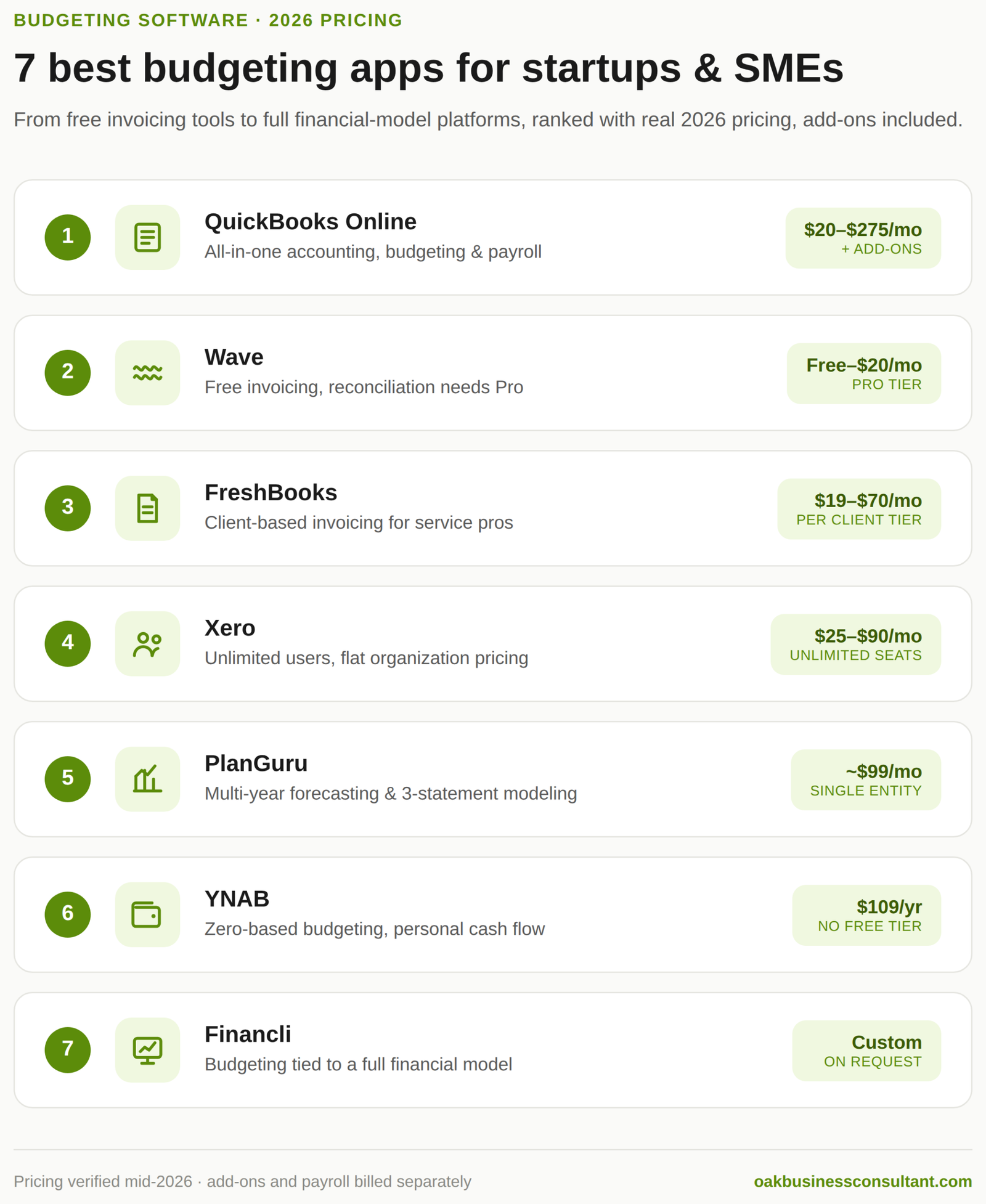
1. QuickBooks Online
QuickBooks is the most widely used small business accounting platform in the US, and it goes well beyond budgeting. It handles invoicing, payroll, tax prep, and a Budget Manager worksheet that lets you build a budget against each of your tracking categories.
Pricing rose 15 to 25 percent across every tier during 2025 and again in 2026, so the numbers many articles still quote are out of date. As of mid-2026, plans run from Solopreneur at $20 a month, up through Simple Start at $38, Essentials at $75, Plus at $115, and Advanced at $275. Payroll, Live Bookkeeping, and QuickBooks Time all sit outside these prices as separate add-ons, so a business with a handful of employees is often paying closer to $150 to $200 a month once payroll is included, not the $30 figure that circulates in older comparisons.
It is more than most pre-revenue startups need on day one, but it is a strong fit once you are past the idea stage and want budgeting, accounting, and tax prep under one roof. If your accountant or bookkeeper already works in QuickBooks, that alone is a good reason to match them.
2. Wave
Wave built its reputation as free accounting software for startups, and the core bookkeeping and invoicing tools are still free on the Starter plan. That said, Wave restructured its pricing over the past two years, and the plan most small businesses actually need now costs money. Bank reconciliation, automated transaction imports, and full reporting sit behind Wave Pro, priced at roughly $16 to $20 a month depending on billing cycle. Payment processing runs 2.9 percent plus 60 cents per card transaction on top of either plan.
For a business in its first months that only needs to send invoices and log income and expenses manually, the free Starter plan genuinely works. Once you want your books reconciled against your bank statement, budget for the Pro tier rather than assuming Wave stays free indefinitely, since the direction of travel over the last two pricing cycles has been toward paid tiers, not away from them.
3. FreshBooks
FreshBooks is built for service-based founders whose main financial tasks are sending invoices and tracking what clients owe. It connects to your bank account or credit card to pull in expenses, lets you photograph receipts, and covers time tracking alongside basic budgeting.
Current pricing runs Lite at roughly $19 to $23 a month for up to five billable clients, Plus at $38 to $43 for up to 50 clients, and Premium at $65 to $70 for unlimited clients, with a custom Select tier above that. The plan is priced per client, not per feature, so a freelancer with six ongoing clients gets forced into the Plus tier even if Lite would otherwise cover their needs. Every plan also includes exactly one user; each additional team member adds roughly $11 a month.
It is not a full budgeting platform in the way QuickBooks or PlanGuru is, but for a consultant, agency, or freelancer-turned-founder, it often covers more of the actual day-to-day work than a dedicated budgeting app would.
4. Xero
Xero is built for businesses that have outgrown a bare-bones budgeting app but are not ready for enterprise software. Its Budget Manager worksheet lets you build an overall budget by tracking category, and its short-term cash flow view gives you a snapshot of where the business stands without digging through reports.
US pricing in 2026 runs Early at $25 a month, Growing at $55, and Established at $90. The detail most comparisons miss: every Xero plan includes unlimited users at no extra cost, which is a genuine structural advantage over QuickBooks, where a sixth user forces an upgrade to the $275 Advanced tier. Payroll is not bundled and typically runs through a Gusto integration starting around $45 to $50 a month, and project tracking is a separate add-on if you need it beyond the Established plan.
Xero also handles invoicing, bill payments, and project tracking, and uses trend analysis to help you spot where a budget is drifting before it becomes a real problem. For a team of five or more where per-seat pricing elsewhere gets expensive fast, Xero’s flat per-organization pricing is worth the closer look.
5. PlanGuru
PlanGuru is budgeting and forecasting software built specifically for early-stage startups and small businesses, not repurposed personal finance software. It builds an integrated income statement, balance sheet, and cash flow statement, and can forecast up to ten years out using more than twenty forecasting methods. It imports historical data from QuickBooks, Xero, or Excel in minutes.
Pricing sits at roughly $99 a month for a single entity, which works out to close to $1,200 in the first year. The interface looks dated next to newer tools, and reviewers consistently mention a learning curve if you are not already comfortable with financial modeling. What you get in return is a level of forecasting depth that a general budgeting app simply does not offer, at a fraction of what enterprise planning software such as Planful or Anaplan costs.
6. YNAB (You Need A Budget)
YNAB is built around zero-based budgeting: every dollar you earn gets assigned a job before you spend it. That approach works well for a solo founder or freelancer with irregular income, since it forces you to plan around what you actually have rather than what you expect to earn.
Pricing is $14.99 a month or $109 a year, up from the $99 annual price older reviews still quote, with a 34-day free trial and no permanent free tier. One subscription covers up to six people through Family Share, and verified students get a full year free. This is the one entry on this list that is genuinely personal-finance software, not business software. It is a solid choice before you incorporate, or if you are tracking your own runway alongside the business, but it is not built to separate business and personal finances the way an LLC eventually needs.
7. Financli
Financli is a financial planning and analysis platform built for startups and small to medium-sized businesses that want budgeting tied directly to a real financial model rather than a standalone expense tracker. Its dashboard gives a live view of cash flow, income, and expenses, and its budgeting tools update in real time as actuals come in, with reporting that flags trends and risks as they show up.
Pricing is available on request rather than published, which is common in this tier of the market. It is a natural next step for a founder who has outgrown a basic budgeting app and wants budgeting, forecasting, and financial reporting working from the same set of numbers instead of three disconnected tools.
Comparing the options: what they actually cost in 2026
| App | Best for | Starting price | Users included | Real-world cost after add-ons |
| QuickBooks Online | All-in-one budgeting, accounting, and payroll | $20–$38/mo | 1 (Simple Start) | $150–$200+/mo with payroll and a few extra users |
| Wave | Startups that mostly need invoicing and manual bookkeeping | Free (Starter) | Unlimited | $16–$20/mo for Pro, plus 2.9% + $0.60 per card payment |
| FreshBooks | Service businesses and freelancers who invoice clients | $19–$23/mo | 1 | +$11/mo per extra team member; jumps tiers once you pass 5 or 50 clients |
| Xero | Growing SMEs that need budget tracking, unlimited users | $25/mo | Unlimited | +$45–$50/mo for payroll via Gusto |
| PlanGuru | Multi-year forecasting and 3-statement modeling | $99/mo | 1 (add-on for more) | Roughly $1,200/year for a single entity |
| YNAB | Solo founders and freelancers with variable personal income | $109/year | Up to 6 (Family Share) | No add-ons; price is the price |
| Financli | Budgeting tied to a full financial model | Contact for pricing | Varies | Depends on quote |
Common budgeting challenges for startups and SMEs
Most of the mistakes founders make with budgeting have nothing to do with which app they picked.
Lack of visibility. Startups and SMEs often struggle to see their full financial picture in real time, which makes it hard to set a realistic budget in the first place. Automated tracking through one of the tools above helps, but only if someone is actually reviewing it monthly, not just letting it run in the background.
Inconsistent or missing historical data. Budgeting relies on historical numbers, and a young startup may not have enough history to project from accurately. This is where a finance professional or a tool like PlanGuru, built for multi-year forecasting on thin data, earns its cost back.
Hidden costs. Software subscriptions, contractor fees, and one-off compliance costs get missed more often than recurring rent or payroll. The same is true of the budgeting apps themselves. As the pricing above shows, the sticker price rarely matches what you pay once payroll, extra users, and payment processing are added. Building a review of “what did we spend last quarter that wasn’t in the plan” into your budgeting process catches most of these before they repeat.
A budget that does not get revisited. A startup’s situation changes fast enough that a budget set once a year and never touched again stops being useful within a few months. Treat it as a living document, not an annual exercise.
Why budgeting for a startup is different from budgeting for an established business
Startups need to prioritize flexibility over precision. A budget that assumes stable, predictable revenue will break the first time a launch slips or a customer churns unexpectedly, so it needs to flex without falling apart. Cash flow management matters more than the income statement in the early days, since a startup can be profitable on paper and still run out of cash. And burn rate, how much cash goes out each month, deserves its own line of tracking separate from the general budget, because it is the number that tells you how much runway is actually left.
Frequently Asked Questions
Can I use a personal budgeting app like YNAB for my business? You can, but it creates problems as the business grows. Personal apps are not built to separate business and personal transactions, which complicates tax prep, and if your business is an LLC, mixing finances in a personal app can weaken the liability protection the LLC is meant to provide. A business-specific app, or at minimum a fully separate business account, keeps the records clean.
What is the difference between a budgeting app and a financial model?
A budgeting app tracks what you are spending against a plan you set once, usually for the year ahead. A financial model, like the ones Oak builds for startups, forecasts revenue, cash flow, and profitability under different scenarios and gets rebuilt as assumptions change, not just tracked against. Most growing startups eventually need both.
How much should a startup expect to pay for budgeting software?
Costs range from free, for Wave’s Starter tier, to $100 to $275 a month for tools with real forecasting depth or full accounting functionality, once payroll and extra users are factored in. Most early-stage startups do not need to spend more than $50 to $75 a month on the software itself before add-ons.
Do I still need a financial model if I already use a budgeting app?
Yes, if you plan to raise funding or want a real answer to how long you can survive at your current burn rate. A budgeting app tells you what happened against a plan. A financial model tells you what is likely to happen next under different assumptions, which is what investors and lenders actually want to see.
Conclusion
A budgeting app keeps your day-to-day spending honest. It will not tell you whether your pricing supports your growth plan, how long your runway lasts under a slower sales scenario, or what your numbers need to look like to raise a round. That is where a startup financial model comes in, built on top of clean budgeting data rather than instead of it.
Oak Business Consultant works with startups and SMEs on both sides of that equation: budgeting and cash flow management day to day, and full financial models and CFO-level strategic advisory when it is time to plan further ahead. If you are building your first real budget or refining a budgeting process that has outgrown a spreadsheet, that is exactly where we can help. Hire our expert budgeting consultant.