7 Smart Financial Tools Every Growing Small Business Needs
7 Smart Financial Tools
Running a small business today means making financial decisions almost every day, and most of them happen with incomplete information. You do not always know your exact cash position, your true customer acquisition cost, or whether next quarter’s revenue will cover next quarter’s payroll. That gap between what you need to know and what you actually know is where most small businesses lose money, not from bad ideas but from decisions made in the dark.
The right financial tools close that gap. They turn scattered numbers in spreadsheets, bank apps, and invoices into a clear, current picture of your business. Below are seven categories of financial tools that consistently separate businesses that scale smoothly from businesses that stall, along with what each one actually solves and how to know if you need it now or later.
1. Accounting software
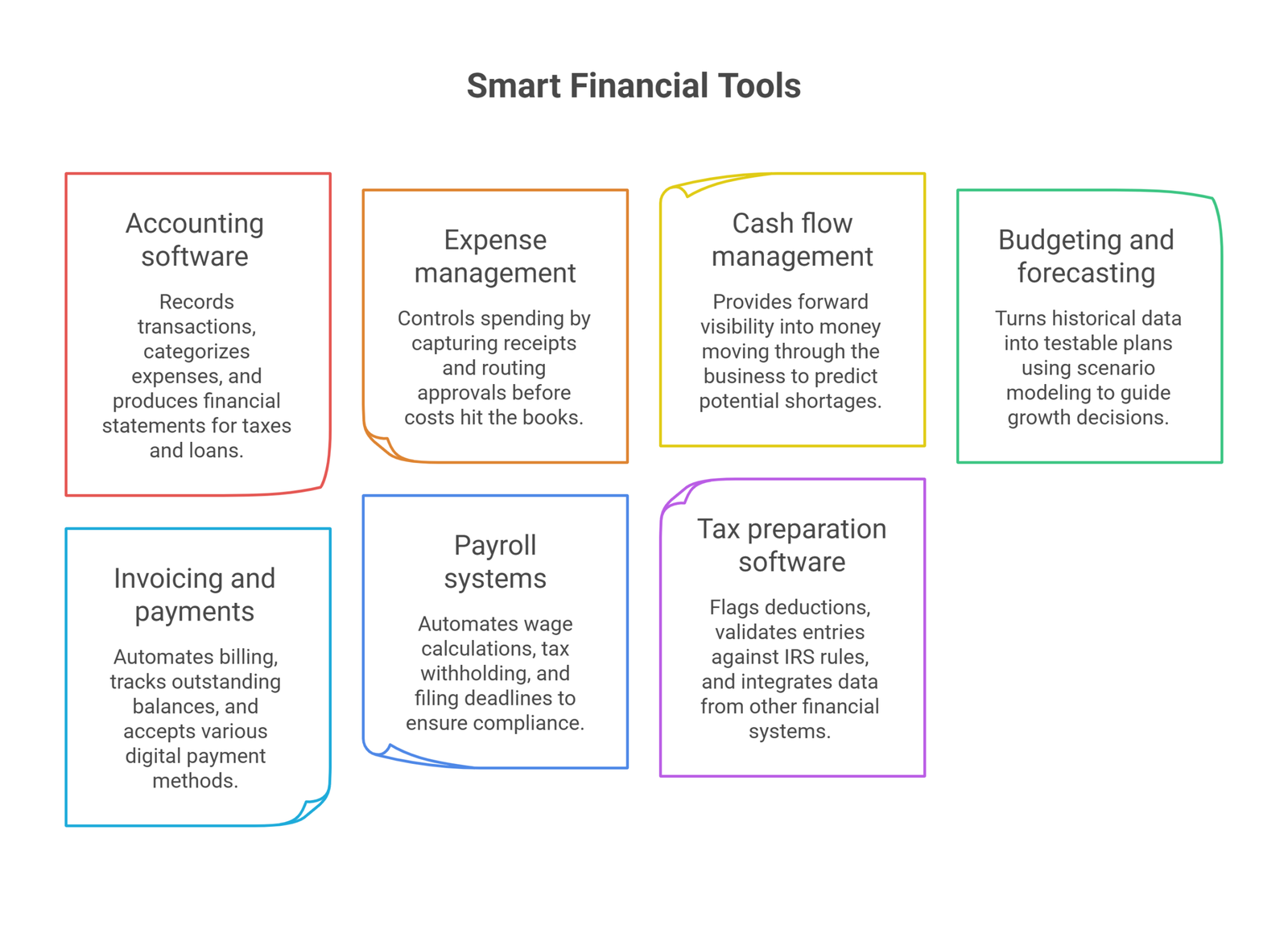
Accounting software is the foundation everything else in this list depends on. It records every transaction, categorizes expenses, and produces the financial statements you need for taxes, loans, and investor conversations. Without it, you are reconstructing your financial history from bank statements every time someone asks a question about your numbers.
Modern platforms go beyond bookkeeping. They reconcile bank feeds automatically, flag unusual transactions, and generate profit and loss statements in real time instead of at month end. For a small business, this means you can check your financial health on a Tuesday afternoon instead of waiting for your bookkeeper’s monthly report.
What to look for: bank-feed automation, multi-user access with permission controls, and clean integration with your invoicing, payroll, and tax tools. A platform that only talks to itself creates the same fragmented picture you are trying to escape. Working with an experienced accounting and bookkeeping partner also helps you set up the chart of accounts correctly from day one, which saves significant cleanup later.
2. Expense management tools
Accounting software tells you what happened. Expense management tools control what happens before it hits your books. As a team grows past a handful of people, expense tracking on spreadsheets and forwarded receipts breaks down fast, and that breakdown is expensive.
Dedicated expense management platforms let employees capture receipts by photo, route approvals automatically, and issue virtual or physical cards with built-in spending limits by category or employee. This removes the manual reimbursement cycle entirely and gives owners real-time visibility into spending instead of a surprise at month end.
The bigger benefit shows up at tax time and during audits. When every expense is already categorized, tagged, and matched to a receipt, your accountant spends less time chasing paperwork and more time finding deductions and flagging risk.
3. Cash flow management tools
More small businesses fail from running out of cash than from having a bad product. Cash flow management tools give you forward visibility into money moving through your business, not just a snapshot of your current balance.
These platforms pull data from your accounting software, invoices, and expense tracking to show when cash is coming in, when it is going out, and where a shortage might appear weeks before it happens. Some include scenario modeling, so you can test what happens to your runway if a client pays 30 days late or if you add a new hire in Q3.
Picture getting an alert that your business is projected to run short of cash in 60 days. Instead of scrambling in month two, you have time to negotiate payment terms, delay a nonessential purchase, or line up a business line of credit while you still have leverage to get good terms. That is the real value of cash flow tools: they turn a reactive scramble into a planned decision. A live cash management dashboard built around your specific KPIs makes this visibility available to your whole leadership team, not just whoever manages the books.
4. Budgeting and forecasting software
Budgeting and forecasting software turns your historical data into a plan you can actually test. Instead of guessing whether you can afford a new hire or a second location, you build a model, adjust the assumptions, and see the outcome before committing real money.
The most useful feature here is scenario planning. What happens to your margins if a major client leaves? What happens to cash if sales grow 20% faster than expected and you need more inventory or staff sooner? Running these questions through a model, rather than a gut check, is what separates disciplined growth from growth that outruns the business’s ability to fund it.
Many forecasting tools also connect to a structured financial model built around your specific business, which matters more than a generic template once your revenue streams or cost structure get complicated. A model built on your actual unit economics catches problems a spreadsheet template never will.
5. Invoicing and online payment tools
Getting paid on time is its own financial discipline, separate from accounting. Invoicing tools replace manual billing with automated systems that send invoices, track what is outstanding, and follow up on overdue balances without an owner having to remember to do it.
Paired with online payment solutions, credit cards, ACH transfers, digital wallets, and recurring billing, this combination removes friction from the entire collection process. Customers pay however they prefer, payments post automatically, and revenue data flows straight into your accounting system already categorized and reconciled.
The compounding effect matters more than it looks on paper. A business that shortens its average collection period from 45 days to 20 days effectively frees up cash without borrowing a cent. That is real, measurable growth capital sitting in unpaid invoices right now for most small businesses.
6. Payroll systems
Payroll is one of the least forgiving parts of running a business. Miscalculate a withholding or miss a filing deadline, and the cost is not just a fixed error. It is penalties, employee trust, and hours of cleanup.
Payroll systems automate wage calculations, tax withholding, and filing deadlines, and most integrate directly with your accounting software so labor costs post automatically without duplicate data entry. This matters even more for businesses that mix W-2 employees and 1099 contractors, since the compliance requirements differ and a good system tracks both correctly. If payroll already feels like a second job, it is worth handing the compliance and processing work to a specialist rather than treating it as something to figure out with software alone.
7. Tax preparation software
Tax preparation software has moved well past filling in digital forms. Modern platforms flag deductions and credits owners commonly miss, validate entries against IRS rules in real time, and pull data directly from your accounting, expense, and payroll systems so nothing has to be entered twice.
That integration is the real value. When your books, expenses, and payroll are already clean and categorized throughout the year, tax season stops being a scramble and becomes a formality. The businesses that dread tax time are almost always the ones reconstructing a year of records in March instead of maintaining them continuously.
For anything beyond straightforward filing, especially multi-state operations, R&D credits, or entity structure questions, working with a tax advisory team alongside your software catches savings that automated tools are not built to find on their own.
How these tools compare
| Tool category | Primary problem it solves | Best fit for |
| Accounting software | Fragmented, outdated financial records | Every business, from day one |
| Expense management | Manual, error-prone spending tracking | Teams with 3+ people spending company money |
| Cash flow management | Reactive scrambling when cash runs short | Businesses with uneven revenue timing |
| Budgeting and forecasting | Growth decisions made on guesswork | Businesses planning hires, locations, or funding |
| Invoicing and payments | Slow, inconsistent collections | Any business billing clients or customers |
| Payroll systems | Compliance risk and manual wage errors | Any business with employees or contractors |
| Tax preparation software | Missed deductions and March scrambles | Every business, paired with year-round bookkeeping |
Choosing the right tools for where you are now
Not every business needs all seven categories on day one, and buying software you are not ready to use is its own kind of waste. A useful way to prioritize is to start with whichever category is currently costing you the most time or the most money, not the one that looks most impressive in a demo.
A few questions worth asking before you commit to any platform: Does it integrate with the accounting software you already use, or will it create another data silo? Can it scale as your team and transaction volume grow, or will you be migrating again in a year? Is the support responsive enough that a billing error gets fixed the same day, not the same month?
Increasingly, the answer to “which tool” also depends on how well a platform uses automation and AI to reduce manual work, since that gap between tools that still require heavy data entry and tools that do not has widened noticeably over the past year.
Frequently Asked Questions
How do financial tools actually improve cash flow, not just visibility into it?
They shorten the gap between spending decisions and information. A cash flow tool that flags a shortfall 60 days out lets an owner negotiate terms or delay a purchase instead of reacting after the cash is already gone, which is the difference between a planned adjustment and an emergency.
What is the difference between budgeting software and a financial model?
Budgeting software tracks planned spending against actual results over a fixed period. A financial model projects how revenue, costs, and cash behave under different scenarios, which makes it better suited to decisions like hiring, expansion, or raising capital.
Should a small business handle payroll with software alone, or bring in outside help?
Software handles calculations and filings well for straightforward payroll. Businesses mixing contractors and employees, operating across states, or managing benefits deductions often save more in avoided penalties than they spend by pairing software with a bookkeeping or CFO partner.
How much time does tax preparation software actually save if the books were not kept clean all year?
Less than expected. Tax software is only as fast as the data feeding it. Businesses that reconcile books monthly turn tax season into a quick review, while businesses that catch up all at once in March lose most of the time savings to cleanup.
Is it worth paying for premium financial tools as a very small business, or should owners start free?
Free tiers are reasonable for basic bookkeeping in the first year. The calculation changes once late payments, missed deductions, or payroll errors start costing more than a subscription would, which for most growing businesses happens sooner than owners expect.
Conclusion
The seven tools covered here are not a shopping list to complete overnight. They are a map of the financial functions every growing business eventually needs to get right, whether that happens through software, outside expertise, or a combination of both. What matters most is that your accounting, cash flow, budgeting, and tax processes talk to each other instead of living in separate spreadsheets no one fully trusts.
Oak Business Consultant helps small businesses build exactly that kind of connected financial foundation, through financial modeling, tax advisory, accounting and bookkeeping, and hands-on fractional CFO support that scales with your business rather than forcing you to figure it out alone. Book a call with our team to find out which of these tools your business actually needs right now, and which ones can wait.