13 Common Pitfalls in Accounting Integration
13 Common Pitfalls in Accounting Integration And How to Fix Them Before They Cost You
Most businesses don’t realize they have an accounting integration problem until something breaks. A payment slips through the cracks. A financial statement doesn’t balance. The finance team spends three days reconciling what should have taken three hours.
The truth is, the common pitfalls in accounting integration are rarely dramatic. They’re quiet. They accumulate. And by the time you notice them, they’ve already done damage to your cash flow, your compliance standing, or your team’s sanity.
This guide walks you through 13 of the most costly mistakes businesses make when connecting their accounting systems, and what to do about each one.
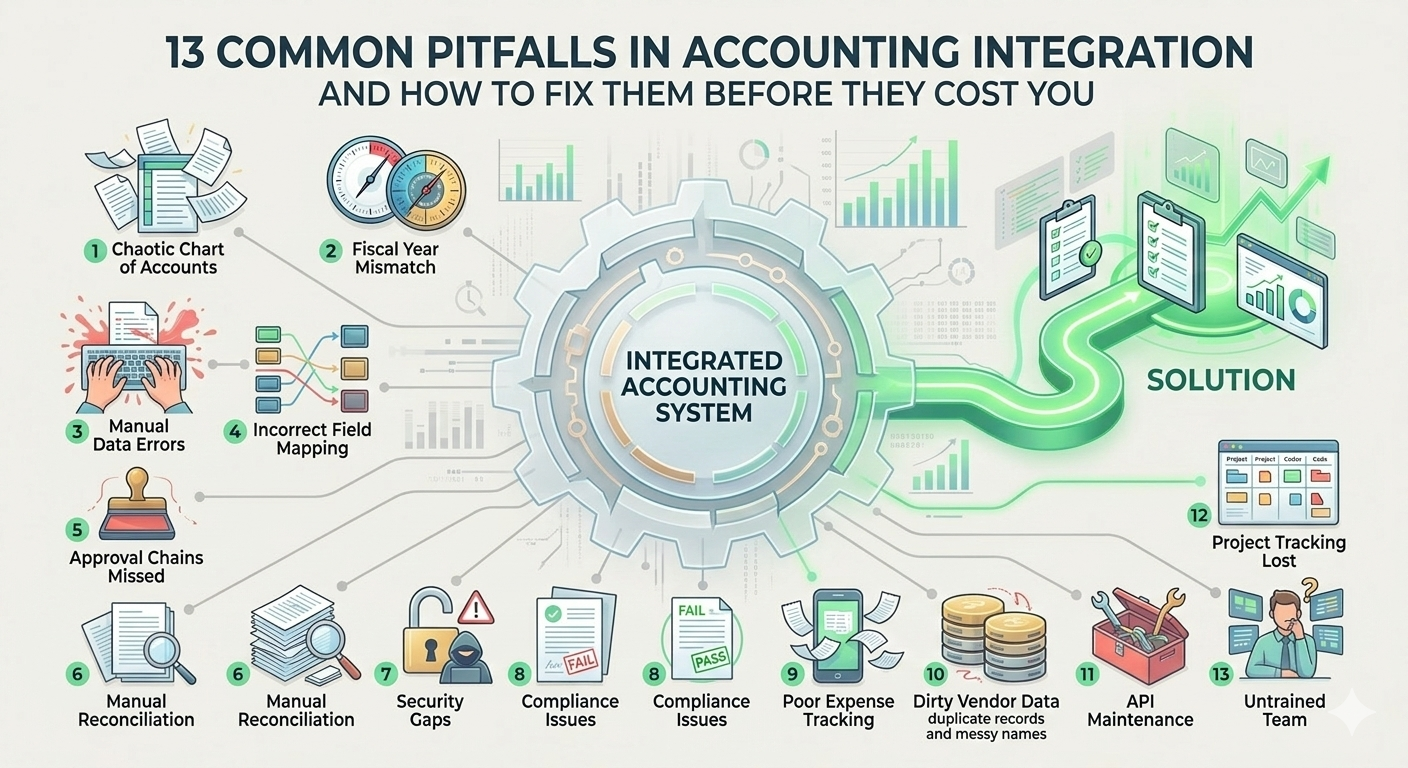
1. Starting Without a Clear Chart of Accounts
Everything in accounting integration flows from the chart of accounts. If it’s messy, outdated, or inconsistent across systems, every sync that follows will carry that chaos forward.
Before connecting any accounting software to another platform, audit your chart of accounts. Remove duplicates. Standardize naming. Make sure every category maps correctly to what your Enterprise Resource Planning system expects on the other end.
A clean chart of accounts is not optional. It’s the foundation everything else is built on.
2. Ignoring Fiscal Year Setup
This one surprises people. Fiscal year setup sounds simple, but mismatches between systems cause reporting errors that are genuinely difficult to trace.
If your accounting software runs on a calendar year but your ERP or payroll platform uses a different fiscal year setup, reports will show numbers that don’t match. Auditors get confused. Leadership gets the wrong picture.
Always confirm fiscal year alignment before going live with any integration. Check it again after every system update.
3. Tolerating Manual Data Entry Errors
Manual data entry errors are the silent killer of accurate financial data. When people retype invoice data, vendor names, or payment terms from one system to another, mistakes happen. Every time.
The problem compounds fast. A wrong vendor name means the general ledger doesn’t reconcile. A mistyped payment amount creates a mismatch in accounts payable. Then someone has to go find it, fix it, and re-enter everything.
The fix is to reduce how much manual intervention your team is doing. Automation tools and optical character recognition technology can extract invoice data directly from documents without a human retyping it. This alone eliminates a huge category of error.
4. Failing to Map Data Fields Correctly
When two accounting systems talk to each other, they need to speak the same language. Field mapping is how you make that happen. But many businesses rush this step.
The result is financial data landing in the wrong place. Customer data attached to the wrong account. Invoice data flowing into a field that doesn’t match the receiving system’s structure.
Take the time to map every field deliberately. Test with sample data before you go live. Check that vendor name, payment terms, tax implications, and amounts all land exactly where they should.
5. Overlooking Approval Chains and Workflow Automation
A common pitfall in accounting integration that many mid-sized businesses hit is this: they automate the data transfer but forget to automate the oversight.
Approval chains need to be built into the integration. Who approves invoices above a certain threshold? And who signs off on credit card payments? Who reviews cross-border payments before they’re released?
Without workflow and approvals baked into the system, payments slip through without the right eyes on them. This creates fraud protection gaps and compliance issues that are very hard to explain to a board or an auditor.
Cloud-based ERP platforms like Sage Intacct support configurable approval chains. Use them.
6. Not Automating the Reconciliation Process
Manual reconciliation is expensive, slow, and error-prone. Yet many businesses still rely on an Excel spreadsheet to match transactions between their bank account, accounts payable ledger, and accounting software.
Automated reconciliation tools use machine learning algorithms to match transactions at scale. They flag exceptions and surface anomalies. They give the finance team hours back every week.
Three-way matching, which confirms that a purchase order, a receiving report, and a vendor invoice all align before payment is released, is another area where automation dramatically reduces risk. Building it into your accounting integrations removes an entire category of manual intervention.
7. Skipping Security Configuration
Integrations open data pathways. And every data pathway is a potential vulnerability.
Multi-factor authentication should be mandatory for anyone accessing financial data through an integrated system. User roles should be configured carefully so data-entry clerks don’t have the same access as a CFO. Audit control logs should track every action.
Fraud protection doesn’t happen automatically. It has to be designed into your accounting systems from the start. This means thinking about who has access to what, and reviewing those permissions regularly as your team grows or changes.
8. Ignoring Compliance Modules and Regulatory Requirements
Regulatory issues are among the most expensive common pitfalls in accounting integration. Businesses often set up integrations without thinking about the compliance modules they need.
Tax rules change. Global e-invoicing mandates are expanding across Europe, Latin America, and Asia. Regional tax rules vary. If your accounting software isn’t configured to handle these, your financial reports will be wrong, and your business could face real penalties.
Build compliance into the integration architecture. This means connecting to compliance modules that handle regulatory changes automatically, rather than relying on someone to update settings manually every time a rule changes.
9. Poor Expense Tracking and Travel Integration
Expense tracking is one of those areas that feels minor until the numbers don’t add up. When employees submit expenses through a mobile app that doesn’t connect properly to your accounting software, data gets lost or duplicated.
Automated expense tracking software with OCR receipt scanning can capture expense data at the point of submission. Real-time expense tracking means the finance team always has an accurate picture of spending. Travel integration that checks GSA per diem allowance rates keeps reimbursements compliant without manual lookups.
The goal is for expense data to flow directly into the general ledger without anyone having to rekey it.
10. Neglecting Vendor Master Data Hygiene
Vendor master data is messier than most businesses realize. Duplicate vendor records, inconsistent vendor names, outdated payment terms, and missing tax information all cause problems downstream.
Before integrating accounts payable with any automation platform or payment systems, clean your vendor master data. Deduplicate records. Confirm that payment terms are accurate. Verify that vendor name formats are consistent across all systems.
This is especially important for businesses that have gone through post-merger integration, where two separate vendor lists often get combined without a proper cleanup.
11. Underestimating API Maintenance
Integrations aren’t set and forget. They break when software updates on either side change how data is structured. Many businesses build an integration, celebrate going live, and then ignore it until something fails.
Monitor API changelogs from your software vendors. Build alerts into your accounting systems so the finance team knows immediately when a sync fails. Assign someone to own the integration ongoing, not just at launch.
Invoice processing delays caused by a broken API can cascade into late payments, damaged vendor relationships, and cash flow problems that take months to unwind.
12. Overlooking Project and Cost Allocation Tracking
For businesses that run projects, track grants, or bill clients by project, cost allocation tracking is critical. When accounting integrations don’t carry project codes or cost centers properly, the financial data becomes useless for project-level reporting.
This is a common pitfall in accounting integration for professional services firms, nonprofits, and construction businesses. The payment process might work fine, but if no one can see which project a cost belongs to, financial statement accuracy suffers.
Map project codes and cost centers as part of your field mapping exercise. Test that they flow correctly. Check them in financial reports before you go live.
13. Not Training the Finance Team on the Integrated System
Technology can solve a lot of problems. But if the finance team doesn’t know how to use the integrated system correctly, the best practices built into the platform get ignored.
People fall back on workarounds. They reopen that Excel spreadsheet. They start doing manual intervention on things the system was supposed to handle automatically. And slowly, the integration breaks down from the inside.
Training is not a one-time event. When systems update, when new staff join, when workflows change, the team needs to be brought back up to speed. Digital record-keeping systems and digital automation only deliver their full value when the people using them understand how they work.
The Bigger Picture: Why These Pitfalls Matter
The common pitfalls in accounting integration aren’t just technical problems. They have real business consequences.
Cash flow visibility suffers when financial data is inaccurate. Compliance issues create legal and financial risk. The finance team wastes time on work that should be automated. Leadership makes decisions based on financial reports that don’t reflect reality.
The businesses that get accounting integration right treat it as a strategic project. They involve finance, IT, and operations. Additionally, they document their chart of accounts and data mapping before they touch a single setting. They build policy enforcement and audit control into the system from the start. And they maintain the integration over time rather than abandoning it after go-live.
Digital connectivity between accounting software, Enterprise Resource Planning platforms, payment systems, and other tools is a genuine competitive advantage when it’s done well. It gives the finance team real-time tracking of cash flow, accounts payable, and financial data across the business. It reduces manual data entry errors and makes financial reports faster and more reliable.
Done poorly, it creates exactly the kind of silent, compounding problems that surface at the worst possible moment.
Frequently Asked Questions
What is accounting integration?
Accounting integration is the process of connecting your accounting software to other business systems, such as an ERP, payroll platform, CRM platform, or payment systems, so that financial data flows automatically between them without manual data entry.
Why do accounting integrations fail?
Most accounting integrations fail due to poor planning rather than bad technology. The most common reasons are mismatched chart of accounts, incomplete field mapping, lack of training, and insufficient ongoing maintenance after go-live.
How do I prevent manual data entry errors in accounting? Use automation tools that extract invoice data and other financial data directly from source documents using optical character recognition. Connect systems so data flows automatically rather than being rekeyed by hand.
What compliance issues should I watch for in accounting integration?
Tax rule changes, global e-invoicing mandates, regional tax rules, and AML requirements can all create compliance issues if your accounting systems aren’t configured to handle them. Build compliance modules into your integration and assign someone to monitor regulatory changes.
How often should accounting integrations be reviewed?
At minimum, review your integrations quarterly. Check API changelogs after any software update. Review user roles and audit control logs at least twice a year. After any significant business change, such as post-merger integration or entering new markets, review the full integration setup.
What is three-way matching in accounts payable?
Three-way matching is the process of verifying that a purchase order, a receiving report, and a vendor invoice all match before releasing payment. It’s a best practice in accounts payable that significantly reduces the risk of fraud and overpayment.
Conclusion
If reading this list felt uncomfortably familiar, you’re not alone. Most growing businesses have at least a few of these problems sitting quietly inside their accounting systems right now.
Getting it right requires more than software. It requires strategic oversight, financial expertise, and someone who can see the whole picture.
Oak Business Consultant’s accounting services give you exactly that. Our team works with your finance team to audit your existing accounting integrations, fix the gaps, and build a financial infrastructure that scales with your business. From chart of accounts cleanup to Enterprise Resource Planning configuration to ongoing compliance monitoring, we handle the complexity so you don’t have to. Schedule a free consultation, and let’s build accounting systems your business can actually rely on.