

Excel and digital templates by Oak Business Consultant
Sugar Mill Excel Financial Model Template
The Sugar Mill Excel Financial Model is a comprehensive tool designed for sugar mill businesses. It offers detailed financial projections, capturing every aspect, from raw material costs to sales revenue. This user-friendly template aids in planning, budgeting, and understanding profit margins, ensuring your sugar mill’s financial success. It is ideal for both startups and established mills.
Original price was: $350.$50Current price is: $50.
- Instant download
- Secure checkout
- Personal & business licence


Product details
5-Year Financial Modeling Framework for your Sugar Mill Business
The sugar industry, a significant player in the food industry, is one of the most capital-intensive sectors. Sugar mills play a pivotal role in the production process. As with any business model, understanding the financial dynamics of a sugar mill is crucial. The Sugar Mill Excel Financial Model Template is designed to provide insights into revenue, multi-period cash inflow stream and gauge the financial strength of a sugar mill. This tool ensures that every decision made is backed by robust financial measurement.
Benefits of Using a Financial Model Template
In the sugar industry, where sources of revenue can be influenced by various factors, such as price fluctuations and market demand, having a reliable financial model like the Sugar Mill Financial Model is paramount. This model aids companies in making strategic decisions, securing financing, and presenting a compelling pitch for funding. Moreover, it simplifies complex performance metrics, making them accessible even to those without a financial background. It also helps in Cutting Expenses and optimizing the cost of capital.
Key Components
Navigating the financial landscape of the sugar industry can be challenging. Our Sugar Mill Excel Financial Model Template is tailored to address the unique financial needs of sugar mills. Whether you’re one of the largest sugar producers or a startup business in the sugar industry, this financial model startup tool will be an invaluable asset. It ensures that your sugar mill financial plan remains profitable and sustainable, even considering initial startup costs. The following are the key components of this excel financial model template:
Input Sheet
The starting point of any financial model. Here, you’ll input data related to capital expenditures, current assets, Long-Term Debt, and other key elements specific to sugar mills.

Revenue Analysis
Dive deep into your revenue streams. Understand the nuances of the sugar industry, from sales to by-products, and gain insights into revenue.

Startup Summary
For those in the startup phase of their sugar mill business, this section breaks down the fixed and operating costs, from the construction of facilities to startup pre-launch expenses.

Income Statement
A comprehensive overview of your sugar mill’s financial performance over specific periods, highlighting profitability KPIs and financial reports.

Balance Sheet
A balance sheet template showcasing your company’s assets, liabilities, and equity at a given period of time.

Cash Flow Statement
Track cash movement within your sugar mill using a clear cash flow format. This statement provides a detailed future cash flow model of your business’s financial health.

Break-Even Analysis
Identify the payback period where your sugar mill starts to profit, factoring in variables like price bid and development cost.

Project Evaluation
Assess individual projects or expansions within your sugar mill, ensuring alignment with your business’s financial goals.

Sensitivity Analysis
Gauge how changes in factors like discount rates or assumptions about growth rates can impact your sugar mill’s profitability.

Diagnostic Sheet
A health check for your sugar mill, pinpointing areas needing attention or restructuring.

Dashboard
A visual representation of your sugar mill’s financial metrics, from profitability KPIs to debt repayment schedules.

Frequently Asked Questions
What are Excel financial models?
Excel financial models, like the Sugar Mill Financial Model, are structured tools used to represent a company’s financial performance. They are essential for financial modeling, understanding financial strength, and making informed decisions in industries like the sugar sector.
How do you present a financial model in Excel?
Presenting a financial model in Excel involves structuring your data in a clear, logical manner, using tables, charts, and templates like the financial projections template, financial projection template, financial statement template, expenditure template, and financial plan template.
How do I create a financial model?
Creating a financial model involves gathering historical data, understanding potential profitability, making assumptions, and using Excel functionalities to represent these data points. Factors like sales prices, cost of assets, and operating assets play a significant role in the sugar industry.
What are the 3 financial statements Excel models?
Excel models have three core financial statements: Income Statement, Balance Sheet, and Cash Flow Statement. Each provides a different perspective on a company’s financial health.
Is Excel used for finance?
Absolutely. Excel is a staple in the finance sector, used for financial modeling, analysis, and forecasting. Its versatility makes it a preferred choice for financial institutions and industries like the sugar sector.
Conclusion
The Sugar Mill Excel Financial Model Template is more than just a spreadsheet; it’s a roadmap for success in the sugar industry. Its comprehensive structure and industry-specific components offer sugar mills a clear path to financial stability and growth. Whether you’re seeking financing from banks, looking to optimize your operations, or aiming to expand, this template is the tool you need. Remember, in the ever-evolving world of the sugar industry, being equipped with the right financial tools can make all the difference.
Walk-Through Video of Sugar Mill Excel Financial Model
The following video will give you an overview of the different components of the financial model and will help you understand it’s working.
How it works
How do you get and use a template?
Three steps from checkout to your own numbers.
1. Check out and download
Add the template to your cart and check out. Your download link appears on the order confirmation and in your account.
2. Add your numbers
Open the file and replace the sample inputs with your own assumptions.
3. Use the results
Review the outputs and charts, and use them in your plan, budget or investor pack.
Template or done for you?
Need it built around your business?
A template suits standard inputs. If you need several entities, an investor or lender-ready model, or a full three-statement forecast, Oak’s financial modelling team can build it with you.
Template vs. done for you
| Option | Template | Done for you |
|---|---|---|
| Who builds it | You | Oak’s team |
| Best for | Standard inputs, one plan | Investor, lender or multi-entity work |
| Next step | Add to cart | Book a 30-minute call |

Related templates
Which templates work well with this one?
Chosen from the same categories in the shop.
Related products
- Browse by Categories, Browse by Industry, Financial Excel Model, Financial Excel Template, KPI Dashboard Excel, Retail Industry Financial Model, Retail Industry Solutions, Startup
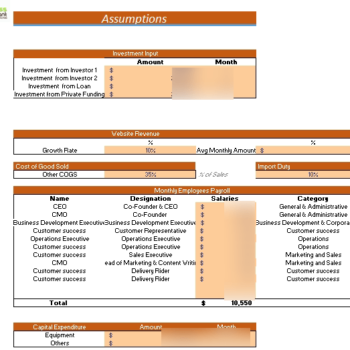
Imported Products Excel Financial Model
Original price was: $250.$50Current price is: $50. - Browse by Categories, Browse by Industry, Deals, Digital Budget Planner, E-Commerce, E-commerce Financial Model, Fashion Retail, Fashion Retail Excel Financial Model, Financial Excel Model, Financial Excel model Valuation Templates, Financial Excel Template, financial forecasting modeling, Financial Forecasting Models, financial model, Financial model excel template, financial modeling, KPI Dashboard Excel, Retail Industry Financial Model, Retail Industry Solutions, Services/ Consulting, Services/ Consulting Financial Model, Small Online Business Excel Financial Model Projection, Startup, Startup Financial Model
Online Fashion Clothing Store Excel Financial Model
Original price was: $125.$50Current price is: $50. - Browse by Categories, Browse by Industry, Deals, E-commerce Financial Model, Financial Excel Model, Financial Excel Template, financial forecasting modeling, Financial Forecasting Models, Financial model excel template, financial modeling, Retail Industry Financial Model, Retail Industry Solutions, Startup
Online Home Décor Store Excel Financial Model Template
Original price was: $300.$50Current price is: $50. - Browse by Categories, Browse by Industry, Deals, Fashion Retail, Fashion Retail Excel Financial Model, Financial Excel Model, Financial Excel Template, Financial Forecasting Models, KPI Dashboard Excel, Retail Industry Financial Model, Retail Industry Solutions, Startup
Rental Clothing Excel Financial Model
Original price was: $190.$50Current price is: $50.



Browse the shopAll templatesTools and templatesFinancial Excel modelsEvery industry
Policies
What should you know before you buy?
Plain-language terms for digital products.
Licence of use
Single licence for personal or business use. Do not redistribute, resell or share the files.
Refunds
Digital products cannot be returned or exchanged once downloaded. Please ask any questions before you buy.
Delivery
Instant digital download after checkout. There is nothing to ship.
SDG note: digital templates and planning tools support SDG 8 (decent work and economic growth), SDG 9 (industry, innovation and infrastructure) and SDG 12 (responsible consumption, with no printing or shipping). Self-assessed by Oak, not a UN endorsement.
Not sure this is the right template?
Book a 30-minute call and we will point you to the right model, or build one for you.
Open 24 hours, Monday to Friday. Closed Saturday and Sunday.
Learn moreAbout OakMeet Sadaf Abbas


