

Excel and digital templates by Oak Business Consultant
Museum Financial Model Template
Oak Business Consultants has perfectly formed the Museum Financial Model Template which incorporated all relevant statements along with important financial metrics. The template contains a guide and is very easy to use yet very dynamic and detailed. The user simply has to enter the information in the INPUT sheet and that’s it. We hope you will love the template.
Original price was: $190.$50Current price is: $50.
- Instant download
- Secure checkout
- Personal & business licence



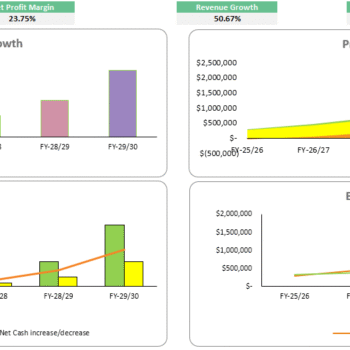
Product details
Overview: Museum Financial Model
Starting your own Museum sounds exciting but it can be very difficult to plan.
But with the help of this tool, “Museum Financial Model,” your journey becomes easier. This tool helps entrepreneurs, startups, and investors gain a clear financial roadmap for their museum business.
Key Features of the Model
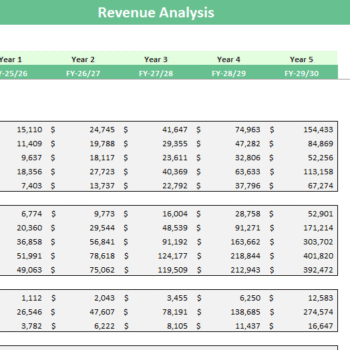
Revenue Projections
- Sales Forecasting: Estimate your future revenue based on customer counts, monthly growth rate, new customers & recurring ones.
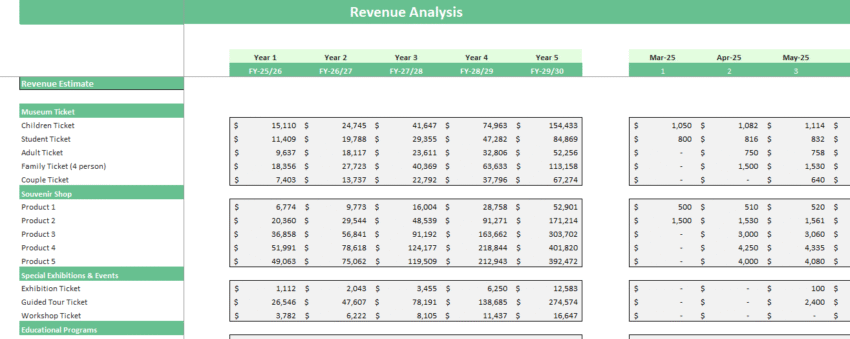
- Revenue by Offer Type: Estimate your future revenue based on types of tickets sold such as Adult, Children, Groups etc.
- Competitive Advantages: Identify what sets your Museum apart in this industry.
Cost Structure
- Direct Costs: Adjust the direct cost such as tickets costs as percentage of your revenue to see where your gross margin lies.
- Administrative Expenses: Account for fixed costs like Rent, permit, marketing and employee salaries etc.
- Business Expenses: Include financial obligations such as financing expenses and business loans.
Profitability Analysis
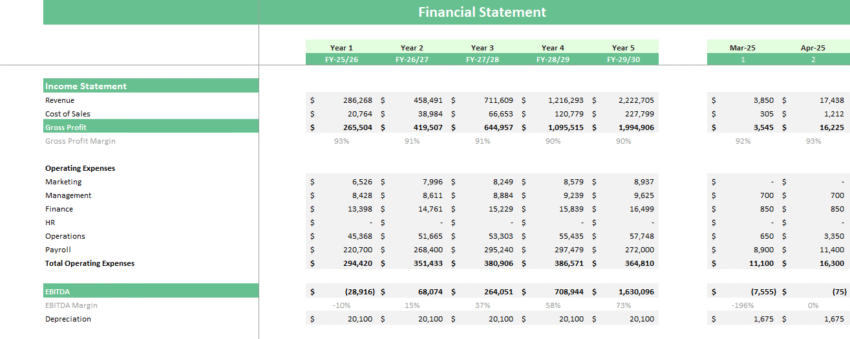
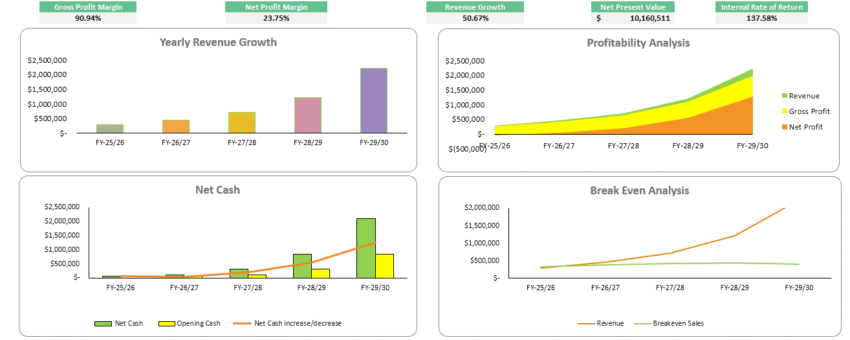
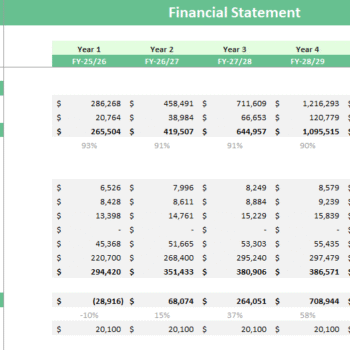
- Profit and Loss Statement: Track income, expenses, and profit over 5 years.
- Gross Margin & Net Profit: Get to know what is the performance of the Museum based on gross and net profit.
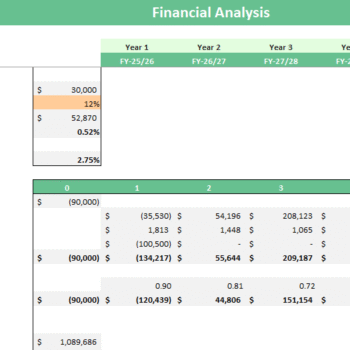
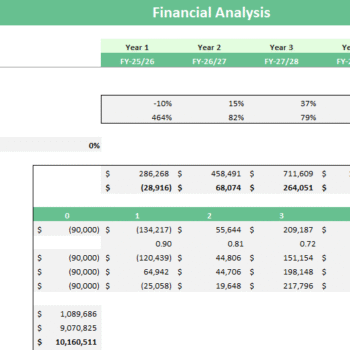
- Break-Even Analysis: Determine the number of total customers needed to cover costs and achieve profitability.
Cash Flow Management
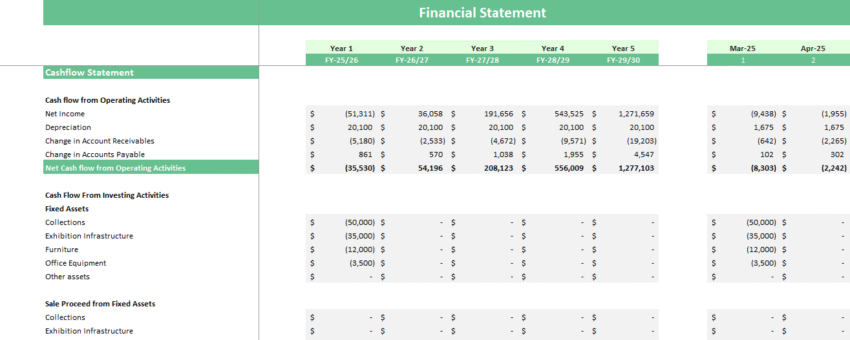
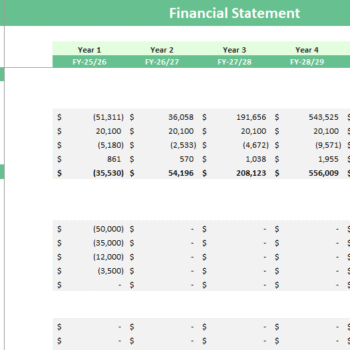
- Cash Flow Statement: Track money flowing in and out of your business.
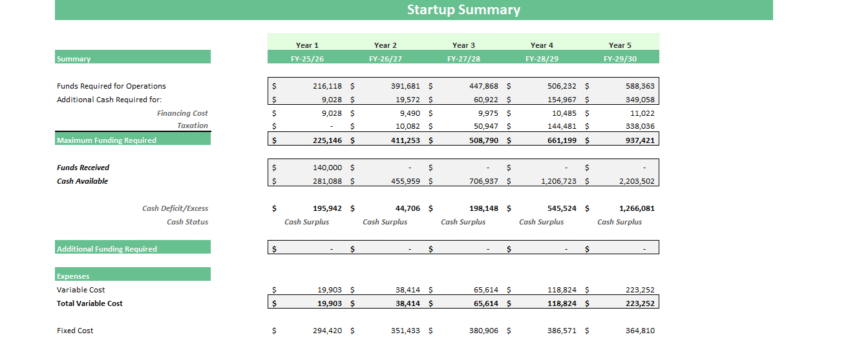
- Financial Position: Ensure adequate working capital for seamless operations.
- Investment Scheduling: Plan accordingly the cashflow to make your investment decisions for a smoother flow of operations.
Financial Forecasting & Scenario Analysis
- 5-Year Financial Plan: Develop long term projections for revenue, expenses, and profitability.
- Market Conditions & Trends: Adjust financial forecasts based on industry changes and customer behavior.
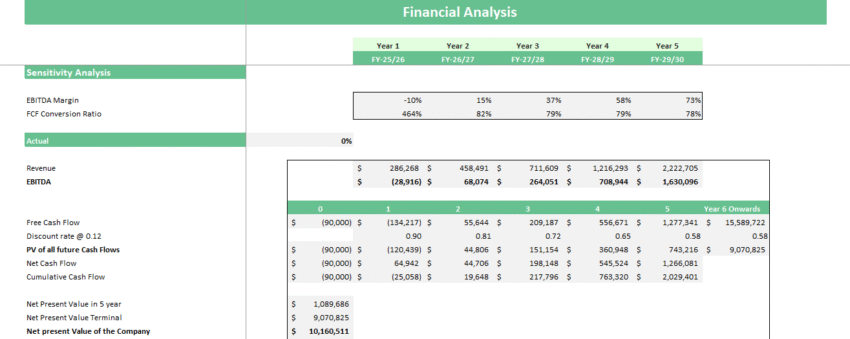
- Best-Case, Base-Case, and Worst-Case Scenarios: Evaluate different financial outcomes and prepare accordingly.
Key Performance Indicators (KPIs)
- Customer Types & Volume: Track customer trends across different tickets categories.
- Customer Retention & Growth Potential: Measure repeated customer and market expansion opportunities.
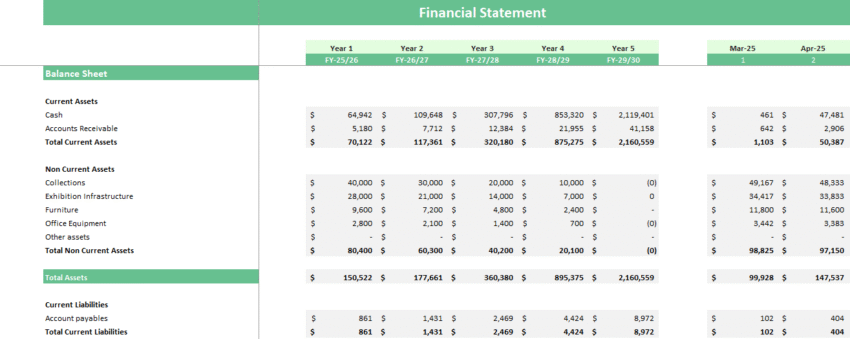
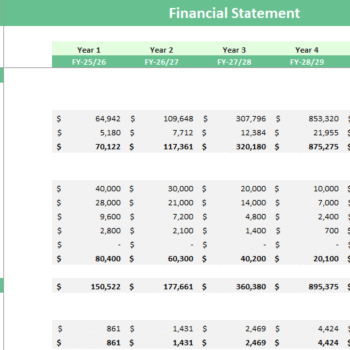
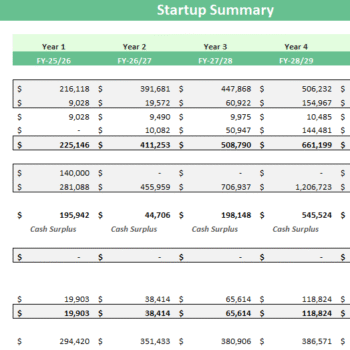
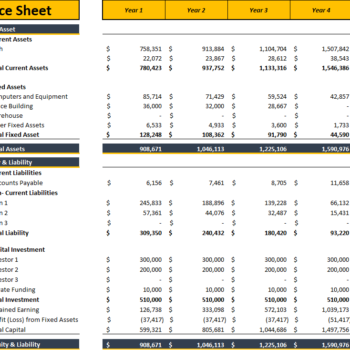
- Financial Statements: Access financial modeling spreadsheets for an in-depth financial breakdown.
Investor Readiness & Business Strategy
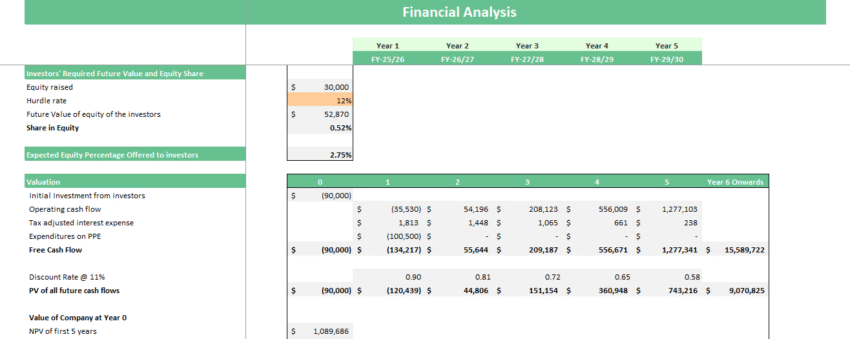
- Attract Potential Investors: Present a professional financial plan to secure funding.
- Strategic Planning: Align business objectives with financial projections for long term success.
- Cost Analysis & Optimization: Better understand which costs can be minimized and which one have to most impact on profitability.
Key Benefits of Using This Model
- Better Financial Planning: Gain a clear understanding of your business’s financial feasibility.
- Optimized Operations: Enhance cost analysis and resource allocation.
- Risk Mitigation: Plan ahead for financial uncertainties and avoid cash shortages.
- Customizable Tool: Adapt the model to fit different Museum needs.
- Scalability: Suitable for both small startups and established agencies.
Who Should Use This Model?
- Entrepreneurs & Startups: Establish a solid financial base for a Museum model.
- Existing Museums: Improve financial planning to make profitability better.
- Investors & Analysts: Evaluate the financial viability of Museum tickets.
- Consultants & Advisors: Offer expert financial insights to clients.
Guide to This Model
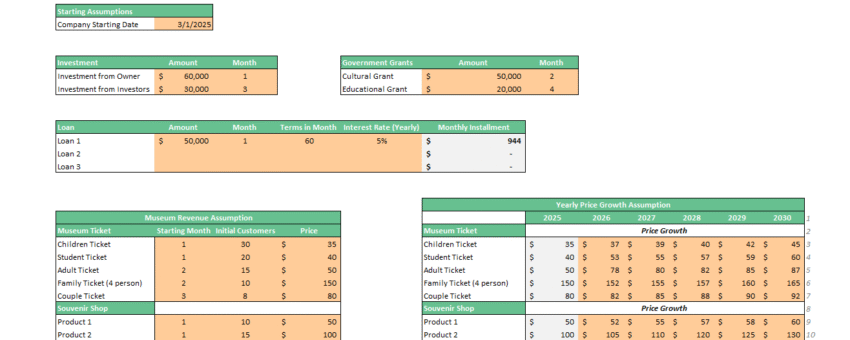
- Enter Assumptions: Input customer volume, starting month, ticket prices, and business operation costs.
- Analyze Financial Statements: Review the 3 main financial statements to assess the financial performance.
- Adjust Scenarios: Test multiple scenarios based on best and worst case to judge business stability.
- Make Informed Decisions: Use data-driven insights to refine marketing, pricing, and investment strategies.
FAQs
1. Do I need Excel skills to use this calculator?
No, it just need you to add basic data.
2. Can I update customer data and revenue easily?
Yes, the model allows easy updates for customer volumes, ticket prices, and revenue streams.
3. Can I track my Museum costs like rent, staff, and utilities?
Yes, the model tracks various expenses that can be changed as per requirement.
4. Does the model help with long-term financial planning for the Museum?
Yes, it includes financial forecasts and scenarios for up to 5 years to support long-term planning.
5. Can I make changes to the formulas in this template?
Yes, the model can be totally edited as per the need.
Terms of Use
Oak Business Consultant and our Museum Excel Financial Model Template are not affiliated with any specific software or platform unless stated otherwise. Your purchase grants you a SINGLE LICENSE FOR PERSONAL OR BUSINESS USE only. Redistribution, resale, or sharing of this template is strictly prohibited. If you find this model useful, please direct others to our store.
Note
This is a digital Excel file. Due to the nature of digital products, returns or exchanges are not available. Please reach out with any questions before purchasing.
Need More Help?
- For a better understanding of this template, watch our YouTube video.
- To get a Customized Model made, email us at info@oakbusinessconsultant.com
Walk through video of Museum Excel Financial Model
How it works
How do you get and use a template?
Three steps from checkout to your own numbers.
1. Check out and download
Add the template to your cart and check out. Your download link appears on the order confirmation and in your account.
2. Add your numbers
Open the file and replace the sample inputs with your own assumptions.
3. Use the results
Review the outputs and charts, and use them in your plan, budget or investor pack.
Template or done for you?
Need it built around your business?
A template suits standard inputs. If you need several entities, an investor or lender-ready model, or a full three-statement forecast, Oak’s financial modelling team can build it with you.
Template vs. done for you
| Option | Template | Done for you |
|---|---|---|
| Who builds it | You | Oak’s team |
| Best for | Standard inputs, one plan | Investor, lender or multi-entity work |
| Next step | Add to cart | Book a 30-minute call |

Related templates
Which templates work well with this one?
Chosen from the same categories in the shop.
Related products
- Browse by Categories, Browse by Industry, Consulting Business, Consulting Business Financial Model, Deals, Financial Excel Model, financial modeling
Consulting Business Excel Financial Model
Original price was: $125.$50Current price is: $50. - Browse by Categories, Browse by Industry, Deals, Financial Excel Model, financial forecasting modeling, Financial Forecasting Models, financial model, Financial model excel template, Retail Industry Financial Model, Retail Industry Solutions, SaaS Industry, SaaS Industry Financial Model, Small Online Business Excel Financial Model Projection, Startup
Online Grocery Delivery Excel Financial Model
Original price was: $125.$50Current price is: $50. - Consulting Business, Consulting Business Financial Model, E-commerce Financial Model, Financial Excel Model, Financial Excel Template, SaaS Industry, SaaS Industry Financial Model, Services/ Consulting, Services/ Consulting Financial Model, Small Online Business Excel Financial Model Projection, Startup
Online Platform for Finance Professionals
Original price was: $125.$95Current price is: $95. - Browse by Categories, Browse by Industry, Financial Excel Model, financial modeling, SaaS Industry, SaaS Industry Financial Model, Small Online Business Excel Financial Model Projection, Software Business Financial model
Task Management Software Excel Financial Model
Original price was: $125.$50Current price is: $50.




Browse the shopAll templatesFree tools and templatesFinancial Excel modelsEvery industry
Policies
What should you know before you buy?
Plain-language terms for digital products.
Licence of use
Single licence for personal or business use. Do not redistribute, resell or share the files.
Refunds
Digital products cannot be returned or exchanged once downloaded. Please ask any questions before you buy.
Delivery
Instant digital download after checkout. There is nothing to ship.
SDG note: digital templates and planning tools support SDG 8 (decent work and economic growth), SDG 9 (industry, innovation and infrastructure) and SDG 12 (responsible consumption, with no printing or shipping). Self-assessed by Oak, not a UN endorsement.
Not sure this is the right template?
Book a 30-minute call and we will point you to the right model, or build one for you.
Open 24 hours, Monday to Friday. Closed Saturday and Sunday.
Learn moreAbout OakMeet Sadaf Abbas


